Invoice Management System
Problem Statement
Allure Home Services receives dozens of supplier invoices every week for cleaning, repairs, landscaping, utilities, and maintenance work across its properties.They faced three recurring pain points:
- Invoices getting lost in inboxes
- Vendors emailed invoices to several addresses (personal emails, the finance inbox, and sometimes even the general support inbox).
- Some invoices were never forwarded to the right person, got buried under other emails, or were opened and “mentally noted” but then forgotten.
- Result: Late payments, supplier complaints, and occasional service interruptions.
- Manual data entry into their invoice tracker
- The finance team used a Google Sheet as a simple invoice log: supplier name, invoice number, amount, due date, cost center, status.
- Staff manually opened each PDF, copied values into the sheet, and then sent a Slack/email notification to the billing team.
- This was error prone (typos, wrong amounts, wrong dates) and time consuming, especially at month end.
- Poor visibility into upcoming cash outflows
- Because invoices weren’t logged consistently, management often lacked an accurate view of how much was due and when.
- Surprises at month end and rushed approvals were common (“We didn’t know we had 15 invoices due this Friday”).
Allure wanted a way to ensure every incoming invoice is captured, organized, and acted on, without depending on individual employees remembering to forward emails or update spreadsheets.
Solution
Designed and implemented an automated invoice management workflow that:
- Captures every invoice email and stores the file in one place
- When an email arrives in the finance inbox with an invoice attached (PDF, image, etc.), the workflow:
- Detects the invoice (based on sender, subject line, and presence of an attachment).
- Automatically saves the invoice file to a dedicated “Supplier Invoices” folder in Google Drive, organized by year/month (e.g., Invoices/2025/12/).
- This creates a clean, structured archive of all invoices without any manual downloading or filing.
- Extracts key details from each invoice
- After storing the file, the workflow:
- Uses an AI model to read and extract important information, such as:
- Supplier name
- Invoice number
- Billed amount
- Currency
- Invoice date
- Due date
- Purchase order number (if present)
- Handles different layouts and formats, so invoices from different vendors can still be processed in a consistent way.
- Logs the invoice into the central tracking sheet
- The extracted details are written into Allure’s Invoice Tracker Google Sheet as a new row
- If an invoice with the same supplier + invoice number already exists, the workflow flags it as a potential duplicate instead of creating a second entry.
- Notifies the billing team with a clear, human readable email
- Once the invoice is logged, the workflow automatically prepares a short, personalized email to the billing team, summarizing the key details:
- Supplier name
- Invoice number
- Amount and currency
- Date received
- Due date
- Direct link to the file in Google Drive and to the row in the invoice sheet
- The AI model drafts this email in the company’s tone of voice (e.g., “Hi team, we’ve just received a new invoice from…”) so it reads like a human written message instead of a cryptic system alert.
- Prevents dropped invoices
- Every processed email is marked or labeled (e.g., “Invoice – Captured”) so the team can easily see what has already been handled by the workflow.
- If any invoice fails to process (e.g., corrupt file), the system sends a special alert so it can be checked manually.
Results
- Zero “forgotten” invoices in the first three months
- 50–70% reduction in manual data entry time
- Fewer payment delays and late fees
- Instant visibility into upcoming payouts
- More robust, auditable process
Quick Demo
Experience a live demo of the invoice management system.Please reach out on my email for a live demo session.
Book a Live Demo
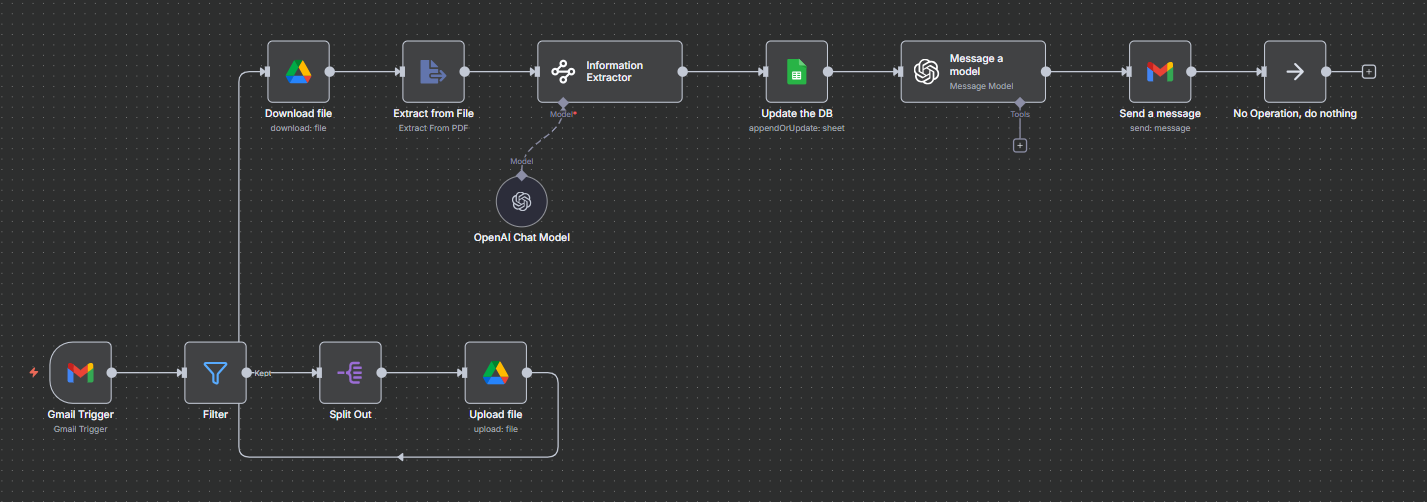
Workflow Diagram
This diagrams illustrate the workflow of the invoice system.
Technology Stack
The system combines workflow automation software, vectore databases, google drive.
- n8n automation platform
- Openai-Chatgpt(LLM of your choice)
- Google Drive